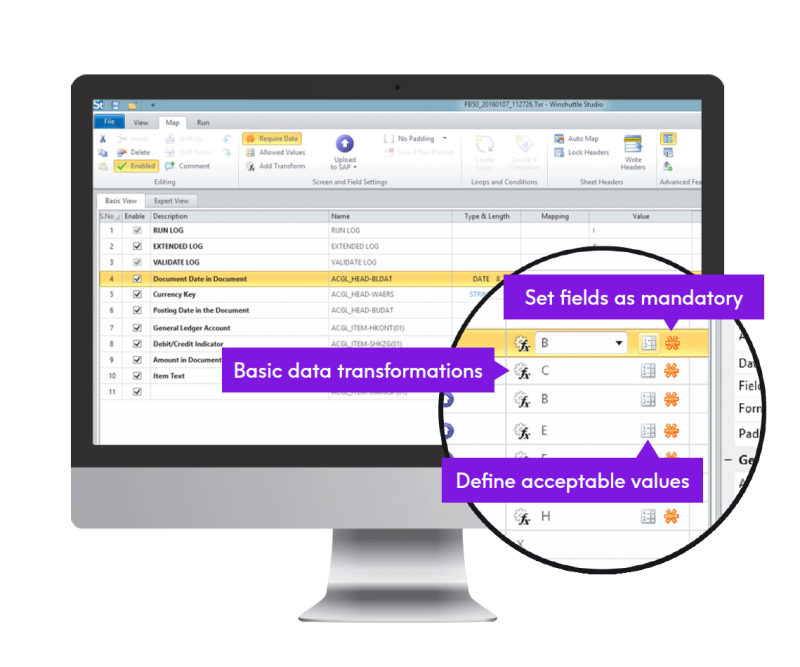






Image showing - SAP Security

SAP Security


How Winshuttle products enhance and ensure SAP security


Strong protection based on integration

The SAP Business Suite contains sensitive data that is essential for day-to-day business operations and for business initiatives and regulatory compliance requirements. Winshuttle supports the extensive authorization functionality built into the SAP Business Suite that protects SAP transactions and data from unwanted access and use and enhances SAP security.

User-enabled data loading requires application of the proper controls, security, and workflows to ensure that SAP transactional data has full end-to-end protection. Data governance best practices presume that any software that integrates with SAP to perform this process must be SAP-certified.


Image of how SAP and Winshuttle interact

Tested and certified SAP security

Tested by SAP, Winshuttle Transaction and Query have received the SAP Certified Integration and Powered by SAP NetWeaver certifications. Both work natively with SAP security technology and use standard SAP authorization profiles to restrict user access and preserve SAP security standards. With Winshuttle products, there are no "back doors."

Transaction authorization for users

Users who do not have access to an SAP transaction cannot use Transaction or Winshuttle Runner for that transaction. These products can only be used for SAP transactions by users who normally have access to those transactions.

RFC authorization for users

In addition to Transaction-level access, Winshuttle users need remote function call (RFC) authorizations to make RFCs to SAP.

Scripts control

Runner users cannot create or modify the script recordings. Their own SAP credentials and authorizations provide users access to a limited set of available scripts and ensure an extra level of control over enterprise data-loading activities.

Scripts file locking

When a script is created, the user who created the file has the option to create a password to protect the file from unauthorized access. Password-protected Shuttle files require users to enter the password each time they want to edit the file.

Automatic backup copies

Transaction can automatically store a backup copy of the current SAP data to an Excel worksheet or Access table before it loads data with a script. This setting can also be used to undo mistakes made in mass changes to data.

Logging and reporting

SAP maintains an audit trail for all Transaction changes and updates just as it does for manual input. In addition, Transaction maintains an activity log at a summary level for each run on either the user's computer or on a network share. More details are available in our Integration and Security white paper.

QUERY security features

Query follows a similar workflow as Transaction for user authentication. Query provides the following security features and products:

Table-level authorizations

To access tables in SAP, Query requires users to have table-view access via the S_TABU_DIS authorization object.

Organization-level security

Query also allows or blocks access to data based on organization-level authorizations (such as company code-level or plant-level authorizations). Query output results are automatically filtered out so that users only see the data relevant to the organization(s) that they have access to.

RFC authorization for the user

In addition to table-level access, Winshuttle users need RFC authorizations to make RFCs to SAP.

Query file control

Runner users cannot create or modify the Query files. Their own SAP credentials and authorizations provide users access to a limited set of available Query files and ensure an extra level of control over enterprise data-extraction activities.

Query file locking

When a Query file is created, the user who created the file has the option to create a password to protect the file from unauthorized access. Password-protected Query files require users to enter the password each they want to edit the file.

Logging and reporting

Query maintains a log of all data extractions for audit purposes.

Ready to learn more?

US + 1 (800) 711-9798
UK + 44 (0) 208 545 9500

With Winshuttle, our HR provider can complete bulk uploads much faster, so we are charged far less. That brings our costs down significantly, allowing us to reinvest those savings into other areas of the business.
Julie Hunt, HR Business Solutions Analyst, Centrica

View all case studies
Free Trial


Improving ERP usability
and customer profitability

  Share


© 2012 Winshuttle, LLC. All rights reserved.