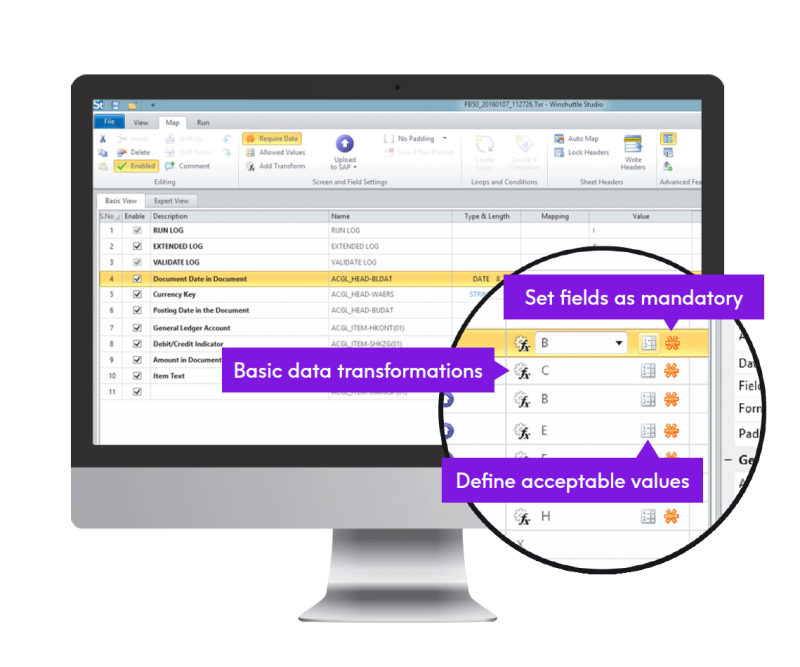






Image showing - Studio

Studio


Combines Winshuttle Transaction, Query, Forms and Direct into one suite


Watch Transaction overview

Watch demo

View in-depth demo of Transaction

Register now

Customer success

Generating an invoice used to be a four- to five-hour process. But with Winshuttle, it only takes four to five minutes.
Robert Glitch, Treasury Manager/Financial Analyst, Murray Energy

Why Use It?

You can realize considerable cost savings and faster ROI on your SAP system by enabling end-users to:

  • Interact with any SAP module from familiar, usable interfaces (Excel, Acrobat, the web, and others)
  • Automate complex SAP business processes to save time and increase efficiency

Because Studio combines four applications into a single solution, it also offers:

  • A significant discount over purchasing the applications individually
  • A simplified licensing structure


Calculate my ROI
BACK TO TOP

What can it do?

The Studio suite consists of four integrated Winshuttle applications that help business users and IT create usable solutions for SAP-centric business processes including supply chain management, HR on-boarding, product development, purchasing, project planning, and payroll processing. The component applications of Studio are:

  • Transaction: Automate SAP data entry and improve the quality of data in your company’s SAP system
  • Query: Extract live and complete SAP data, analyze it in familiar, more usable BI interfaces—such as Excel or Access—and make timely operational decisions.
  • Forms: Quickly create secure, compliant forms that help employees, suppliers, customers, and partners accelerate SAP processes.
  • Direct: Enable technical users to access SAP business APIs (BAPIs) and create easy-to-use Excel-based templates for any SAP business process.

Winshuttle Studio includes Transaction

Download white paper
BACK TO TOP

How does it work?

Studio allows companies or departments to quickly create and implement forms—in Excel, Adobe Forms, InfoPath, browsers, or other familiar interfaces—to allow users to enter and change SAP data. It also streamlines batched SAP processes, such as mass record create or change. With Studio, users can move beyond transaction-based recording, and implement scripts that use SAP Business API (BAPI) capabilities, all without programming expertise.

For more information about each component application, refer to the product pages for Winshuttle Transaction, Query, Forms, and Direct.

Studio also includes Winshuttle Query (shown here), plus Forms and Direct...
Winshuttle Studio also includes Winshuttle Query, plus Forms and Direct

BACK TO TOP

FAQs


If I own transaction can I upgrade to Studio?

Yes, Winshuttle offers upgrades from Transaction to Studio.  Contact your Winshuttle sales representative for details.

Do I have to install any thing on my SAP system to use Studio?

Studio works without installing anything on your SAP system. However, Query offers additional features with the SAP function module installed. See Query for more details

What part of Forms is included in Studio?

Winshuttle Forms client is part of Studio. It has two components: the Forms designer and the Forms wizard. The application is available as both a browser based and a desktop solution. The browser based solution is accessed via Winshuttle Server forms services.

How do I use Winshuttle Forms purchased in Studio?

Winshuttle Central, Winshuttle Server forms services, and Winshuttle Server transaction services must be installed in order to use the Winshuttle Forms client. These components are needed because:
  • Winshuttle forms use HTML forms that connect to SAP using web-services.
  • The forms are stored in SharePoint and
  • These products are needed use the web-services that connect to SAP


BACK TO TOP


Start with Winshuttle today
US +1 (800) 711-9798
UK +44 (0) 208 704-4147


Improving ERP usability
and customer profitability

  Share


© 2012 Winshuttle, LLC. All rights reserved.